Keeping configurations sane for multiple projects on Google Container Engine

In my previous post, I present the easist and most secure way to get kubectl working for one project. But what about mutiple projects? Juggle mutiple projects on Google Container Engine (GKE) can be hard, especially when its configurations are admittedly quirky. This post describes the best practice, in my opinion, to keep configurations sane and easy to switch.

Problem

Suppose you have an awesome app that runs on GKE. You probably want to have two different environments staging and production, and the environments should be completely isolated. So you create two projects on GKE, awesome-app-staging and awesome-app-production, and provisioned resources for each. Now the question is how to effectively switch between the two projects on command line without repeating these commands over and over again.
»

Docker Workflow

In my previous posts, I demoed how to orchestrate Docker with Swarm and Kubernetes. They all assume the Docker image chenglong/simple-node is already there and ready to be deployed. But how to develop that image in the first place? How to streamline and automate the process of developing it on local machine, building and testing it on Continuous Integration (CI) server, and finally deploying to production?

This post introduces one possible Docker workflow.

»

Orchestrating Docker with Kubernetes

This is my second post on Docker orchestration. In the first post, I demonstrated orchestrating Docker with Swarm, Machine, Compose and Consul. This post is to demonstrate orchestrating the same app with Kubernetes and draw comparisons between them. I recommend reading that post before this.

Introduction to Kubernetes

Kubernetes is an open-source system for automating deployment, operations, and scaling of containerized applications.

It groups containers that make up an application into logical units for easy management and discovery. Kubernetes builds upon a decade and a half of experience of running production workloads at Google, combined with best-of-breed ideas and practices from the community.

»

Orchestrating Docker with Swarm, Machine, Compose and Consul

With multi-host networking ready for production and the announcement of Swarm 1.0, I think it’s time to give Docker a serious try. This post details the steps I took to orchestrate a multi-host and multi-container app.

Architecture

Screen-Shot-2016-04-15-at-12-57-55-AM

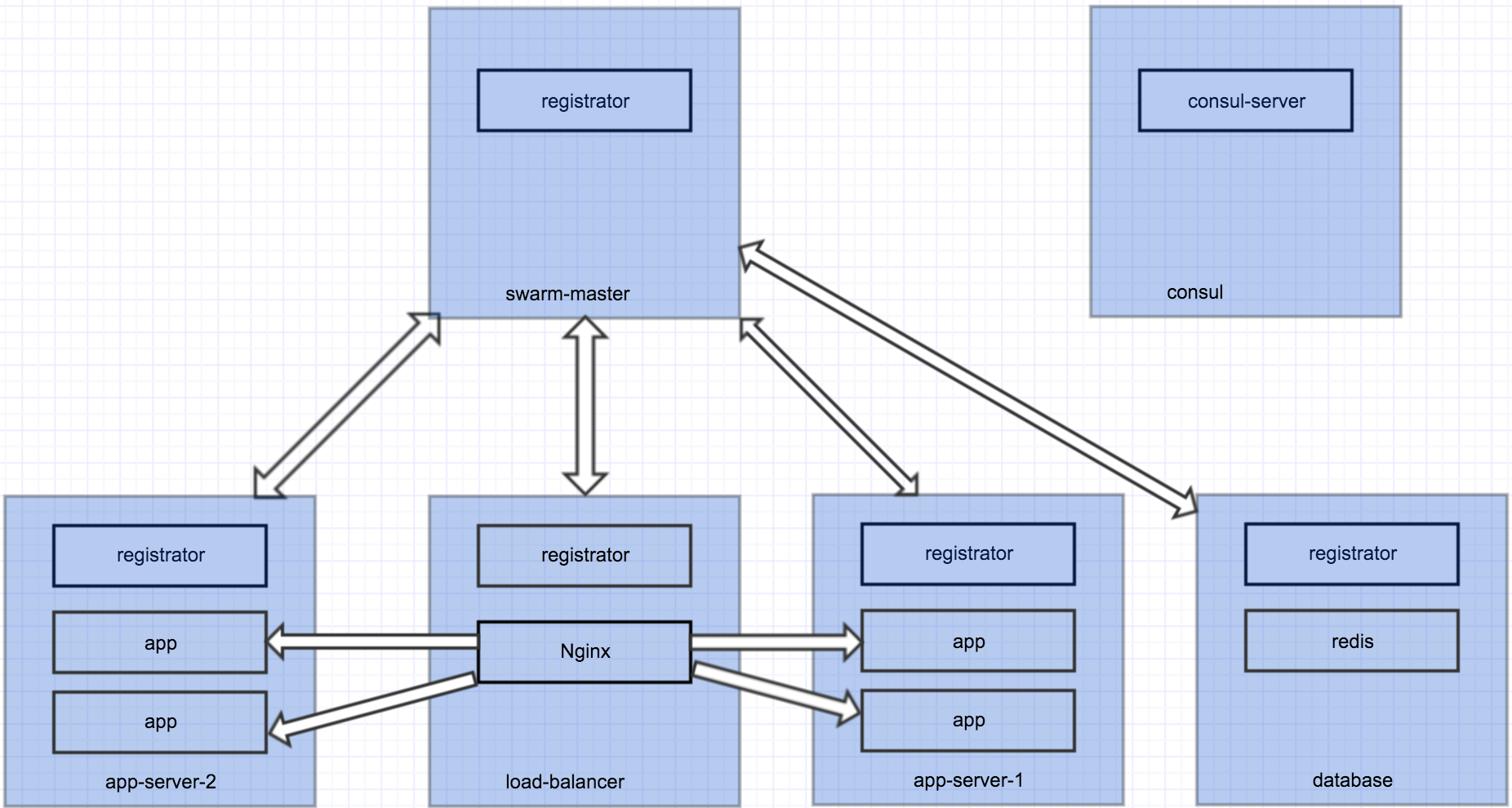
This is a simple Node app that uses Redis as database, load balanced by Nginx. Each blue box is a Docker host, which runs several containers. All hosts talk to Consul for service discovery. The cluster has 5 nodes, each serves a specific purpose. We want to easily scale up and down the number of app containers.

»

Using Docker for Rails Development

Why

There are many use cases of Docker. I see people primarily using it for Continous Integration and deployment. But Docker is also good for development. The obvious advantages of using Docker for development are:

  • No need to install app dependencies on dev machines. App dependencies are built into Docker images. Hence, the dev machines are not messed up with crazy dependencies. The only dependency needed on dev machines is Docker, nothing else.
  • Have a consistent development environment for all developers. No more excuse like “It works on my machine”!
  • Onboard new developers quickly. No need to spend hours setting up new dev machine and configuring it. You only need docker-compose up and you can start coding.

Prerequisites

This post will show you how to setup a Ruby on Rails development environment using Docker. My dev machine has

»