Gmail Sending Limit

Many people use Gmail as personal emails. Companies use Google Apps for Work. Everyone is happy using it. Not until you hit its limits.

I recently learnt its limits (shown below) in a hard way.
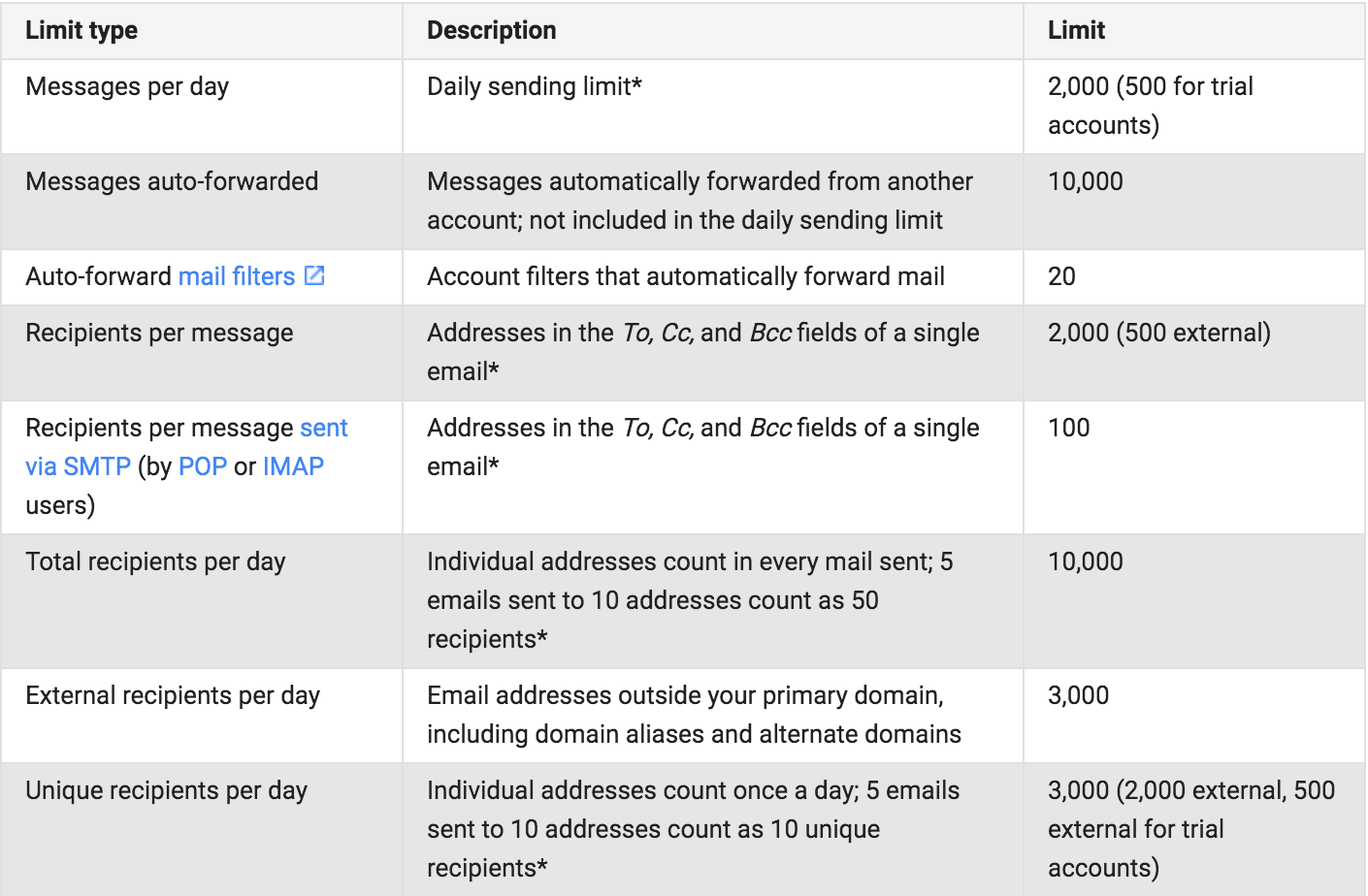
Screen-Shot-2016-04-08-at-3-33-16-PM

I will hightlight the most restrictive constraints from the above:

  • You can send max 2000 emails per day from one account, 500 for trial accounts
  • 3000 unique recipients per day, 500 for trial accounts

From what I understand, normal Gmail accounts have the same limits as trial accounts. What are trial accounts? When you sign up Google Apps for Work, all users are in trial period for 30 days. And it’s free during this period. After trial, you have to pay ~$5/user/month.

»

Life is Short. Run Tests in Parallel

If you are doing Rails, chances are that you have RSpec and Cucumber tests. They are great tools to give you the confidence that your software is working as expected. But as project grows, you may find that your tests are getting slower and slower, expecially the Cucumber tests. It not only slows down the speed of your local development, but also your Continuous Integration pipeline (Test is probably the first stage in your CI). We don’t want to waste time waiting tests to finish in either local or CI. We want to develop and integrate faster. Here is how.

»

HTTP/2

What is HTTP/2 and Why

HTTP/1.1 has been serving most part of the Web since 1997. As websites get more and more sophisticated and resource intensive, it starts to show its limitations, e.g. one outstanding request per TCP connection. So its next-generation emerged: HTTP/2.

HTTP/2 FAQ does a great job explaining the background and specifications. Highly recommended. Here is an executive summary, HTTP/2:

  • is specifically designed to improve performance
  • is based on SPDY
  • is binary, instead of textual
  • is fully multiplexed, instead of ordered and blocking
  • can therefore use one connection for parallelism
  • uses header compression to reduce overhead
  • allows servers to push responses proactively into client caches
  • is backward-compatible, designed to be drop-in replacement for HTTP/1.1
  • is supported by most broswers over TLS

HttpWatch reported good performance improvement by using HTTP/2.

»

Using Docker for Rails Development

Why

There are many use cases of Docker. I see people primarily using it for Continous Integration and deployment. But Docker is also good for development. The obvious advantages of using Docker for development are:

  • No need to install app dependencies on dev machines. App dependencies are built into Docker images. Hence, the dev machines are not messed up with crazy dependencies. The only dependency needed on dev machines is Docker, nothing else.
  • Have a consistent development environment for all developers. No more excuse like “It works on my machine”!
  • Onboard new developers quickly. No need to spend hours setting up new dev machine and configuring it. You only need docker-compose up and you can start coding.

Prerequisites

This post will show you how to setup a Ruby on Rails development environment using Docker. My dev machine has

»

Let's Encrypt Nginx

Update [2017 Aug 5]: Certbot has been developed by EFF and others as an easy-to-use automatic client that fetches and deploys SSL/TLS certificates. I would recommend using it.

Why

Since you are here, you probably know what Let’s Encrypt is and why it exists. If not, below is an executive summary (copied from here):

Anyone who has gone through the trouble of setting up a secure website knows what a hassle getting and maintaining a certificate can be. Let’s Encrypt automates away the pain and lets site operators turn on and manage HTTPS with simple commands.

»

Gradle Offline Build

The Problem

In a recent project, I have to do Gradle build on a CI server in a very constrained environment. The constraints are:

  • NO Internet connection
  • NO Gradle installed
  • NO local Maven repo

The obvious problem that these constraints cause is that the project can’t build because:

  • Gradle is not installed
  • Can’t get dependencies

The Solution

This solution will achieve the following:

  1. Use Gradle to build
  2. Use Gradle to manage dependencies

Let’s solve the problem step by step.

»

Speed up bundle install

TL;DR Next time, when you need bundle install, do bundle install --jobs X, where X is the number of your machine cores. It will save you huge amount of time.

Some blog suggests that setting the number of jobs to X-1 is statistically better than X. But that is not true anymore, at least with bundler >= 1.7.12. To prove this, I tested it on a large Rails project (discourse) on my Mid 2012 MBP with 2.6 GHz Intel Core i7. Below is my test result:

»

Less frequently used git commands

From time to time, I find myself or my peers not using git correctly or efficiently. This is largely due to the fact that some git commands are less well known and used. Below are a few commands that could be helpful but less frequently used.

git bisect

Suppose you find that commit c100 is failing your tests. But it was running fine at commit c67. You want to know which commit in the range (c67, c100] introduced the bug.

»

Cheng Long on #git,

Full Access to Mobile Technologies Is NOT a Previlege, It's a RIGHT

It’s the end of 2013. I would like to share some thoughts on the new mobile trend.

Several events happened in the second half of 2013:

Look at these phones, they all have decent display, CPU, camera, etc. And considering their prices, I realize that their value to price ratio is ridiculously high.

»