Let's Encrypt Intranet

Let’s Encrypt (LE) has been a popular choice to get certs for public websites. Because it’s free and automated. But how to get certs for private websites, which are common in company’s intranet?

Problem

  • There’s a web app in your company’s intranet.
  • The web app has a fully qualified domain name (FQDN), e.g. foo.example.com, not an internal one like foo.internal.
  • It only resolves to a private IP behind VPN. Therefore, it’s inaccessible without a valid VPN.
  • You want to add an extra layer of security by enabling HTTPS.

How to get a cert for it? And how to automate it and get it for free?

»

Multirepo vs Monorepo

Here’s a conversion I keep hearing recently:

A: Let’s put all our projects in one repo.

B: Why?

A: Because Google and Facebook do monorepo.

Whenever I hear this, I’m very tempted to show this picture.

JohnFrumCrossTanna1967-1

Finding the origin of this picture is left as an exercise for the readers. On a more serious note, I want to write down my thoughts on multirepo vs monorepo.

What is multirepo?

One project one repository. Each project is an independent working unit. It can be a mobile app, frontend app, backend service or standalone CLI app.

»

Be wary of http/client.go

Recently, I found out an interesting problem in Go. The problem can be reduced to a simple client request to a HTTP server.

Suppose we have a HTTP server, which serves only one rooted path /foo/.

package main

import (
	"io"
	"log"
	"net/http"
	"net/http/httputil"
)

func handleFoo(w http.ResponseWriter, req *http.Request) {
	// request details
	dump, _ := httputil.DumpRequest(req, true)
	log.Println(string(dump))

	if auth := req.Header.Get("Authorization"); auth != "Bearer GoodToken" {
		http.Error(w, "401 Unauthorized", http.StatusUnauthorized)
		return
	}

	io.WriteString(w, "Hello World!")
}

func main() {
	http.HandleFunc("/foo/", handleFoo)
	log.Fatal(http.ListenAndServe(":12345", nil))
}

handleFoo simplily verifies that correct token is sent in the Authorization header. Otherwise, it returns 401 Unauthorized.

»

Keeping configurations sane for multiple projects on Google Container Engine

In my previous post, I present the easist and most secure way to get kubectl working for one project. But what about mutiple projects? Juggle mutiple projects on Google Container Engine (GKE) can be hard, especially when its configurations are admittedly quirky. This post describes the best practice, in my opinion, to keep configurations sane and easy to switch.

Problem

Suppose you have an awesome app that runs on GKE. You probably want to have two different environments staging and production, and the environments should be completely isolated. So you create two projects on GKE, awesome-app-staging and awesome-app-production, and provisioned resources for each. Now the question is how to effectively switch between the two projects on command line without repeating these commands over and over again.

»

kubectl Authentication Made Simple

While working on a continuous delivery pipeline to automate deployment to Google Container Engine (GKE), I found that getting kubectl to work is very complexandconvoluted, especially when it needs to be noninteractive. So I want to find out the easiest way to get kubectl working noninteractively.

Assuming that gcloud and kubectl are already installed but not necessarily setup, ONLY two commands are needed to get kubectl working noninteractively (verified with Google Cloud SDK 141.0.0 and kubectl 1.5.2)

»

Speed Up SSH

Recently I worked on a project where executing remote commands is very slow to start. This is expected because an SSH connection has to be established first.

$ time ssh server exit
ssh server exit  0.04s user 0.01s system 0% cpu 7.901 total

It took nearly 8 seconds to ssh into server.

That’s slow!

After a bit of googling, there is an elegant way to speed this up. Simply put this at the bottom of your ~/.ssh/config.

»

Cheng Long on #ssh,

Ruby and Java Stack Level

While coding for an algorithmic problem, I discovered that Ruby’s stack level is much shallower than Java. This caused a recursive DFS solution written in Ruby failed due to stack level too deep (SystemStackError), while the same code written in Java passed. Whether recursion or tail recursion should be used is not the point of this post. This post is to find out what the max stack level is and what limits the stack level.

»

Docker Workflow

In my previous posts, I demoed how to orchestrate Docker with Swarm and Kubernetes. They all assume the Docker image chenglong/simple-node is already there and ready to be deployed. But how to develop that image in the first place? How to streamline and automate the process of developing it on local machine, building and testing it on Continuous Integration (CI) server, and finally deploying to production?

This post introduces one possible Docker workflow.

»

Orchestrating Docker with Kubernetes

This is my second post on Docker orchestration. In the first post, I demonstrated orchestrating Docker with Swarm, Machine, Compose and Consul. This post is to demonstrate orchestrating the same app with Kubernetes and draw comparisons between them. I recommend reading that post before this.

Introduction to Kubernetes

Kubernetes is an open-source system for automating deployment, operations, and scaling of containerized applications.

It groups containers that make up an application into logical units for easy management and discovery. Kubernetes builds upon a decade and a half of experience of running production workloads at Google, combined with best-of-breed ideas and practices from the community.

»

Orchestrating Docker with Swarm, Machine, Compose and Consul

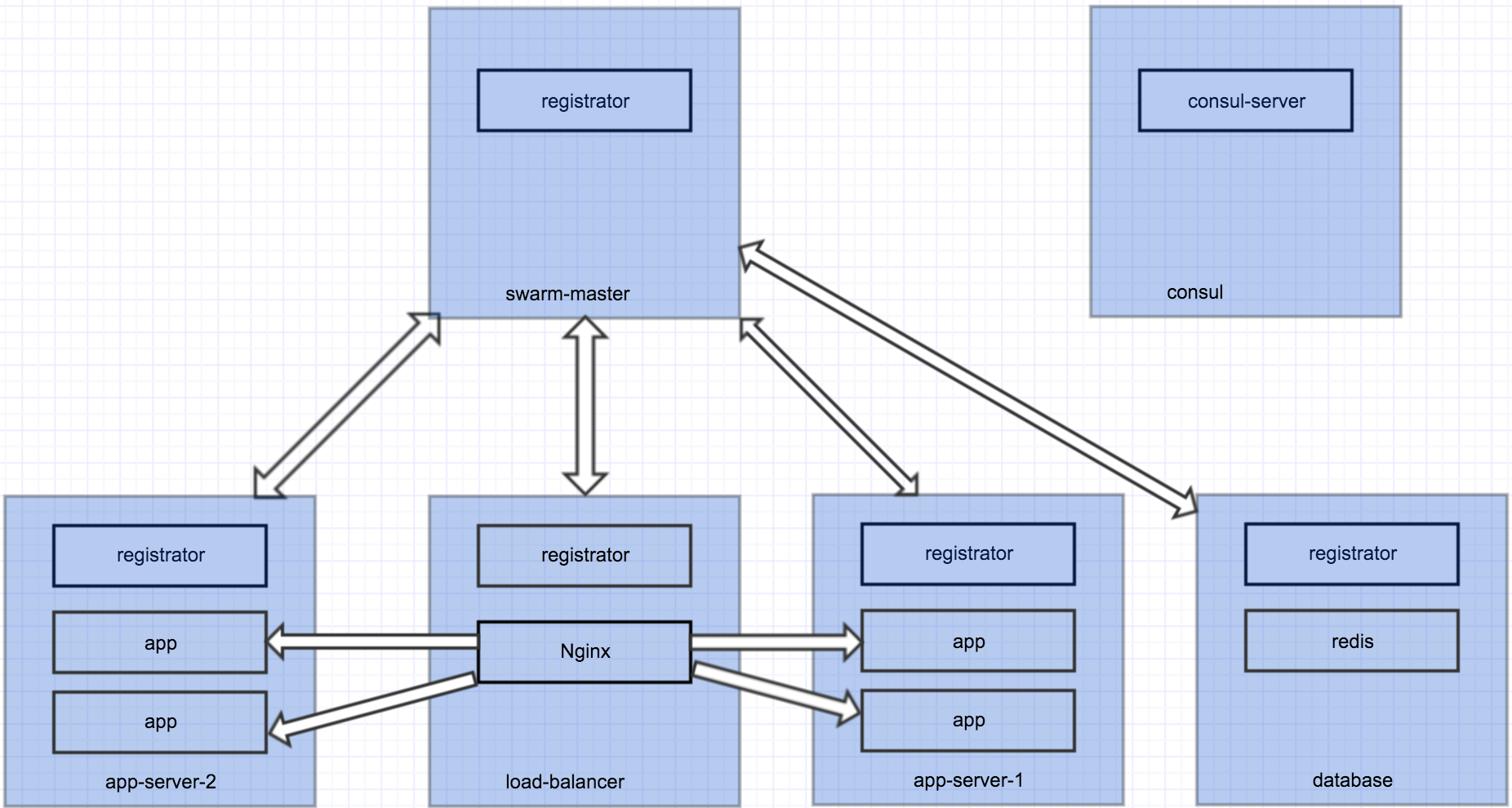
With multi-host networking ready for production and the announcement of Swarm 1.0, I think it’s time to give Docker a serious try. This post details the steps I took to orchestrate a multi-host and multi-container app.

Architecture

Screen-Shot-2016-04-15-at-12-57-55-AM

This is a simple Node app that uses Redis as database, load balanced by Nginx. Each blue box is a Docker host, which runs several containers. All hosts talk to Consul for service discovery. The cluster has 5 nodes, each serves a specific purpose. We want to easily scale up and down the number of app containers.

»